Zlib alternative libraries fall into two groups: drop-in DEFLATE implementations that keep full format compatibility, and newer formats that trade compatibility for better speed or smaller files. Picking well depends on whether other software must read your data and which matters more, compression ratio or speed.
Why Look for an Alternative at All
zlib favours portability and stability over peak performance. Its code runs almost anywhere, and its formats appear inside PNG, ZIP, gzip and HTTP. For many projects that is exactly right, and switching away brings little benefit.
Other projects hit limits. Large data pipelines may want faster compression, archival storage may want smaller output, and real-time systems may need decompression that barely touches the CPU. Those needs are where alternatives earn a closer look.
A Small Measured Comparison
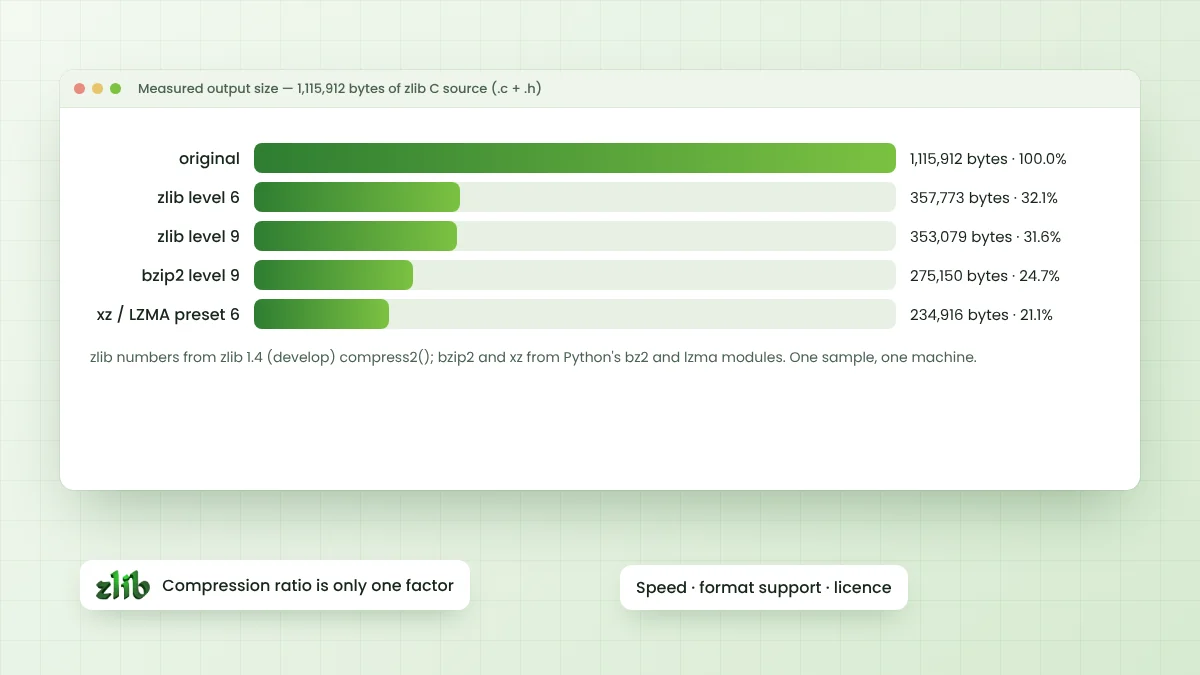
To ground the discussion, the complete zlib C source code, 1,115,912 bytes of .c and .h files, was compressed on one machine. zlib figures come from zlib 1.4 built from the develop branch, while bzip2 and xz came from Python's standard bz2 and lzma modules.
| Method | Output size | Share of original |
|---|---|---|
| zlib level 6 | 357,773 bytes | 32.1% |
| zlib level 9 | 353,079 bytes | 31.6% |
| bzip2 level 9 | 275,150 bytes | 24.7% |
| xz / LZMA preset 6 | 234,916 bytes | 21.1% |
In the same Python test harness, xz took several times longer than zlib at level 6. One sample on one machine proves little in general, so treat these numbers as an illustration and measure with your own data before deciding.
DEFLATE-Compatible Replacements
These options read and write the same zlib, gzip and raw DEFLATE formats. Existing files, network peers and tools keep working, which makes them the safest kind of replacement when compatibility cannot be broken.
zlib-ng
zlib-ng is a separate project focused on modern processors, using SIMD instructions and other optimisations. It offers a compatibility build mode that exposes the classic zlib API, so many programs can switch with only a rebuild. Output bytes may differ from zlib while staying valid DEFLATE.
libdeflate
libdeflate targets fast compression and decompression of whole buffers in memory. It supports DEFLATE, zlib and gzip formats and often beats zlib on speed and ratio at matching settings. It does not offer a streaming API, so data must fit in memory at once.
miniz
miniz packs DEFLATE compression, decompression and basic ZIP handling into a very small codebase. It appeals to embedded projects and single-file builds that want minimal setup, with an API close to zlib for common calls.
Different Formats with Different Trade-offs
These libraries use their own formats, so data written with them is not readable by zlib. In return they can reach better ratios, much higher speeds, or both. Every reader of the data must support the chosen format.
| Library | Main strength | Typical use |
|---|---|---|
| Zstandard (zstd) | Strong ratio with high speed, wide level range | Data pipelines, backups, packages |
| Brotli | Good ratio on web text, built-in dictionary | HTTP content encoding, web fonts |
| LZ4 | Extremely fast compression and decompression | Real-time data, caches, databases |
| xz / LZMA | Very small output, slower compression | Software distribution, archives |
| bzip2 | Better ratio than DEFLATE on text | Older archives and tooling |
How to Choose
Start with the question of who reads the data. Formats fixed by an outside specification, such as PNG, ZIP or gzip files exchanged with other tools, require DEFLATE. Within that limit, zlib-ng or libdeflate can still deliver extra speed.
When you control both ends, newer formats become possible. A quick test on representative data usually settles the choice faster than reading benchmark tables, because results shift a lot between text, binaries, logs and media.
- Need maximum compatibility: stay with zlib.
- Need DEFLATE but faster: try zlib-ng or libdeflate.
- Need small files and control both ends: compare Zstandard and xz.
- Need raw speed: look at LZ4 or low Zstandard levels.
- Serving web text: Brotli alongside gzip for older clients.
Tune zlib Before Replacing It
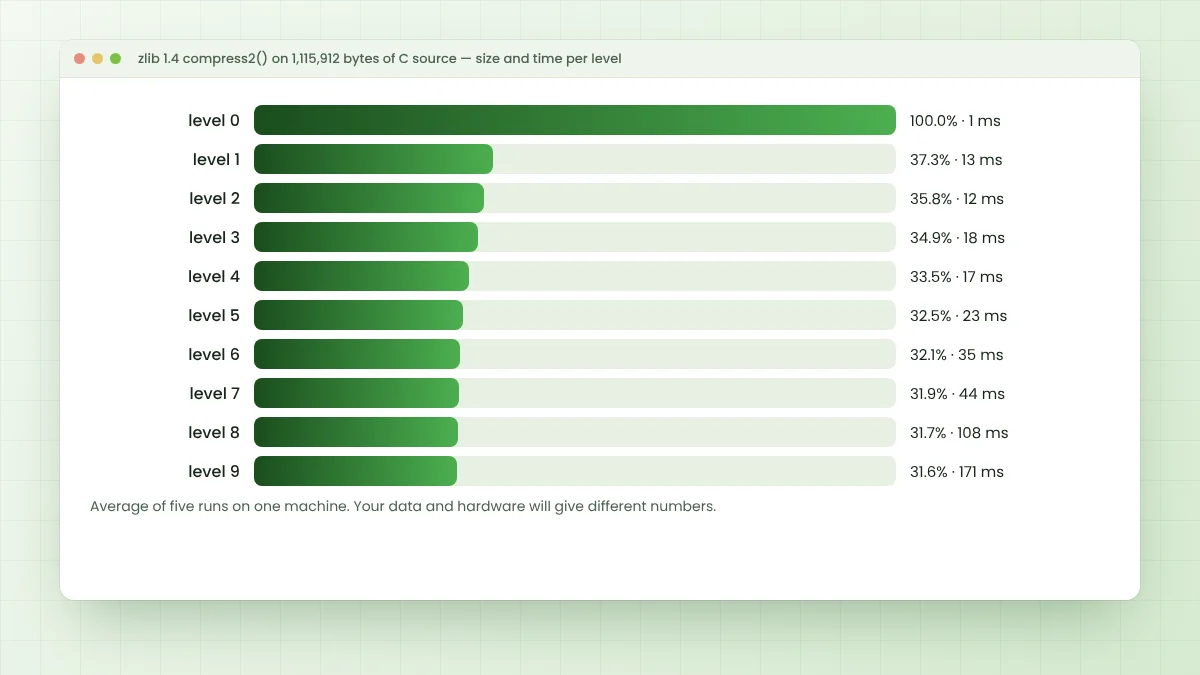
Sometimes a better setting solves the problem without a new dependency. Lowering the level from 9 to 6 can cut compression time sharply for a tiny size cost, while strategies such as Z_RLE or Z_FILTERED suit particular data. The compression levels guide shows measured trade-offs.
Buffer sizes matter too. Feeding deflate() larger chunks reduces call overhead, and reusing a z_stream with deflateReset() avoids repeated setup costs when compressing many small messages one after another.
Costs of Switching Formats
Moving to a new format touches more than one library call. Every reader, from backend services to mobile clients and command-line tools, must gain support, and old data written in DEFLATE still needs a reader for as long as it is kept.
Build systems, licenses and security updates also multiply with each new dependency. Many teams therefore keep zlib for interchange formats and adopt a newer format only inside systems they fully control, such as internal storage or caches.
Using More Than One Library
Mixing libraries is common and sensible. A service might store internal data with Zstandard, serve web content with Brotli and gzip, and still read and write ZIP or PNG files through zlib. Each format simply sits where its strengths matter most.
Frequently Asked Questions
No single option wins everywhere. zlib-ng and libdeflate keep DEFLATE compatibility with extra speed, while Zstandard is a popular new-format choice that balances ratio and speed.
Its compatibility mode exposes the classic zlib API, so many programs only need a rebuild. Test thoroughly, since compressed bytes may differ while remaining valid.
No. Those are different formats with their own libraries. zlib reads only zlib, gzip and raw DEFLATE streams.
xz (LZMA) and Zstandard at high levels usually produce smaller archives than zlib, at the cost of slower compression and a different format.
Conclusion
Zlib alternative choices depend first on compatibility. DEFLATE-compatible libraries like zlib-ng, libdeflate and miniz keep existing formats intact, while Zstandard, Brotli, LZ4 and xz offer new trade-offs when you control every reader.
Measure with your own data, consider tuning zlib before replacing it, and switch only when the gain clearly outweighs the cost of a new dependency and format.