Zlib errors appear as negative return codes from functions such as uncompress(), inflate() and deflateInit(), and each value points to a specific cause. Z_DATA_ERROR and Z_BUF_ERROR are the two that developers meet most, and both are usually quick to fix once their meaning is clear.
How zlib Reports Problems
zlib functions return an int. Zero or positive values signal success or progress, while negative values signal problems. Streaming functions may also set strm->msg to a short text description, which is worth logging next to the numeric code.
| Code | Value | Short meaning |
|---|---|---|
| Z_OK | 0 | Call succeeded |
| Z_STREAM_END | 1 | All data processed |
| Z_NEED_DICT | 2 | Preset dictionary needed |
| Z_ERRNO | -1 | File system error |
| Z_STREAM_ERROR | -2 | Bad parameter or state |
| Z_DATA_ERROR | -3 | Invalid or corrupted data |
| Z_MEM_ERROR | -4 | Out of memory |
| Z_BUF_ERROR | -5 | No progress possible |
| Z_VERSION_ERROR | -6 | Header and library mismatch |
Triggering Errors on Purpose
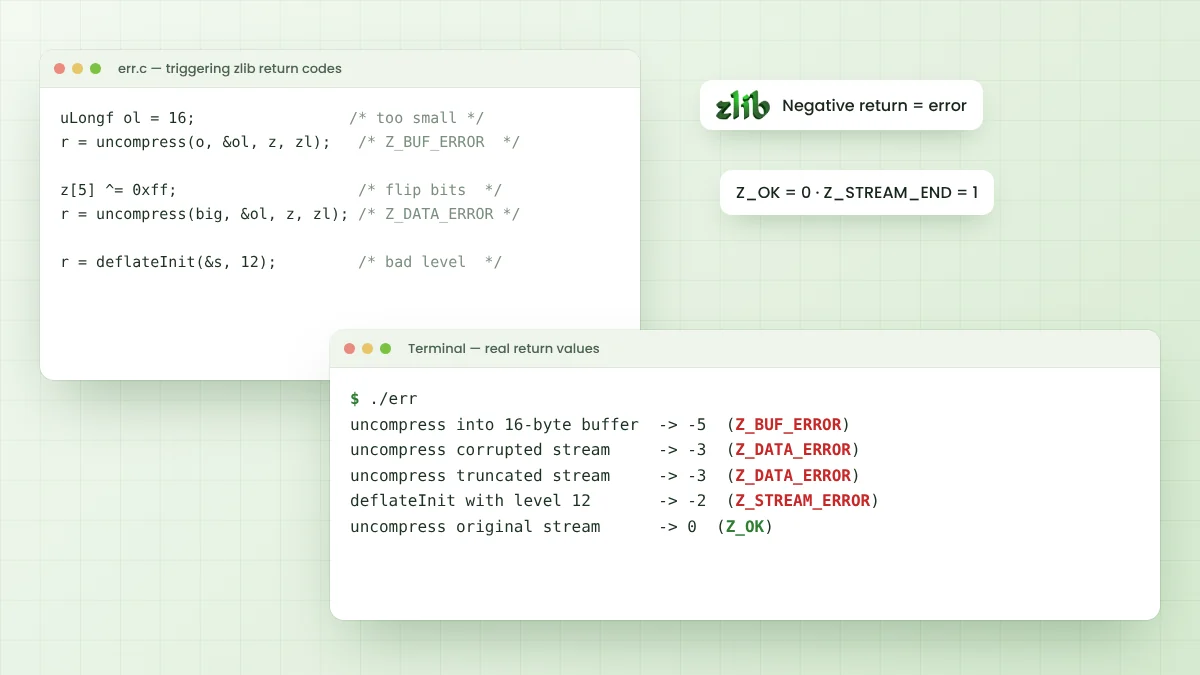
A small test program built against zlib 1.4 shows these codes in action. It compresses a short message and then makes controlled mistakes: a tiny output buffer, a flipped byte, a cut-off stream and an invalid level. Real output looked like this:
uncompress into 16-byte buffer  -> -5  (Z_BUF_ERROR)
uncompress corrupted stream     -> -3  (Z_DATA_ERROR)
uncompress truncated stream     -> -3  (Z_DATA_ERROR)
deflateInit with level 12       -> -2  (Z_STREAM_ERROR)
uncompress original stream      -> 0  (Z_OK)
Reproducing a failure in a tiny program like this is one of the fastest debugging techniques. It isolates zlib behaviour from the rest of your application and confirms which input causes the problem.
Fixing Z_DATA_ERROR
Z_DATA_ERROR means the input is not valid for the decoder as configured. Either the bytes are damaged, the stream is incomplete, or the data uses a different wrapper than the one inflate expects. The checksum at the end of zlib and gzip streams catches many forms of damage.
Wrong Format Settings
A very common cause is a format mismatch. gzip data fed to a decoder set up for zlib fails at once, and so does raw DEFLATE from a ZIP entry. Match windowBits in inflateInit2() to the data you actually have.
| Data starts with | Likely format | windowBits for inflateInit2() |
|---|---|---|
| 78 01, 78 5e, 78 9c or 78 da | zlib | 15 |
| 1f 8b | gzip | 31 |
| No recognisable header | Raw DEFLATE | -15 |
| Unknown, zlib or gzip | Either | 47 (15 plus 32, automatic detection) |
Damaged or Truncated Data
When the format is right, look at how the bytes travelled. Text-mode file handling on Windows can change line endings inside binary data, network code can stop reading early, and database columns can trim or re-encode bytes. Always open compressed files in binary mode.
- Compare the byte length before sending and after receiving.
- Store compressed data as binary, never as a plain text string.
- Check that Base64 encoding and decoding happen exactly once.
- Log the first few bytes in hex to confirm the header.
Fixing Z_BUF_ERROR
Z_BUF_ERROR means zlib could not make progress. With uncompress(), it nearly always means the output buffer is too small for the restored data. The zlib FAQ also stresses that the destination length must be set to the real buffer size before each call.
With deflate() and inflate(), Z_BUF_ERROR is not fatal. It simply says that avail_in or avail_out is zero, so the next call needs more input or more output space. Loops that refill buffers and call again handle it naturally.
do {
    strm.avail_out = CHUNK;
    strm.next_out  = out;
    ret = inflate(&strm, Z_NO_FLUSH);
    if (ret == Z_DATA_ERROR || ret == Z_MEM_ERROR) break;
    fwrite(out, 1, CHUNK - strm.avail_out, dest);
} while (strm.avail_out == 0);
When the Output Size Is Unknown
When the original size is unknown, store it alongside the compressed data or switch from uncompress() to a streaming inflate loop. compressBound() gives the worst-case size for the opposite direction, when allocating for compress().
Fixing Z_STREAM_ERROR
Z_STREAM_ERROR flags an invalid argument or a z_stream in the wrong state. Typical causes are a level outside -1 to 9, a windowBits value outside the allowed range, or calling deflate() on a stream that was never initialised or already ended.
- Zero the z_stream structure before deflateInit() or inflateInit().
- Check every Init call's return value before using the stream.
- Never call deflate() after deflateEnd() on the same stream.
Z_MEM_ERROR and Z_VERSION_ERROR
Z_MEM_ERROR means an allocation failed. It is rare on desktops but possible on small devices, where lowering windowBits and memLevel reduces memory use. Custom allocators set through zalloc and zfree must also return valid memory or Z_NULL.
Z_VERSION_ERROR means the zlib.h used during compilation does not match the library loaded at run time. Rebuild against one consistent copy, and check for older DLLs or shared libraries earlier on the search path.
Handling Z_NEED_DICT
Z_NEED_DICT is a positive value, not an error, yet it stops inflate until it is handled. It appears when the stream was compressed with a preset dictionary. Call inflateSetDictionary() with the same dictionary the sender used, then continue calling inflate().
A Debugging Checklist
- Print the numeric return code and
strm.msgwhenever a call fails. - Dump the first eight bytes of the input in hex to identify the format.
- Confirm the input length matches what the sender produced.
- Check that avail_in, avail_out and the buffer pointers are set before each call.
- Test with a known-good stream produced by the same zlib version.
Working through these points in order resolves the large majority of zlib problems. The hex dump step alone often reveals a wrong format or a text-encoding mistake within seconds.
Treat Untrusted Input Carefully
Compressed data from outside your program should be handled defensively. Set a maximum output size so a tiny input cannot expand into gigabytes, and stop once that limit is reached. Keep zlib updated, since the 1.4 ChangeLog lists several memory-safety fixes.
Errors from gz* File Functions
The gzread() and gzwrite() family returns byte counts, with -1 or 0 signalling failure depending on the function. Call gzerror() to fetch the detailed error number and message. A Z_ERRNO result there means the operating system reported the problem, so check errno for the real cause.
When the Problem Is the Build
Linker messages such as undefined reference to inflate are build issues rather than zlib return codes. They mean the library is not linked, or the wrong architecture is linked. The zlib Windows guide covers these cases for Visual Studio, and the zlib wiki reference lists every constant.
Conclusion
Zlib errors become manageable once each return code is read as a hint. Z_DATA_ERROR points to damaged data or a format mismatch, Z_BUF_ERROR points to buffer space, and Z_STREAM_ERROR points to invalid parameters or stream state.
Check every return value, log the first bytes in hex, and reproduce failures in a small test program. Those habits turn most zlib problems into quick fixes.