Zlib APK searches usually come from people who expect a downloadable Android app called zlib, but zlib is a compression library rather than an app. It still matters a great deal on Android, because every APK file is a ZIP archive whose contents commonly use DEFLATE, the very method zlib implements.
Is There an Official zlib APK?
No official zlib APK exists, because zlib has no screens, buttons or user interface. It is a set of C functions that other programs call to compress and decompress data. Developers build it into their software, and end users benefit without ever seeing it.
Files offered online under a name like zlib APK are therefore unrelated third-party apps. Installing unknown APKs carries real risk, so stick to trusted stores and verified publishers for anything you install on a phone.
An APK Is a ZIP Archive
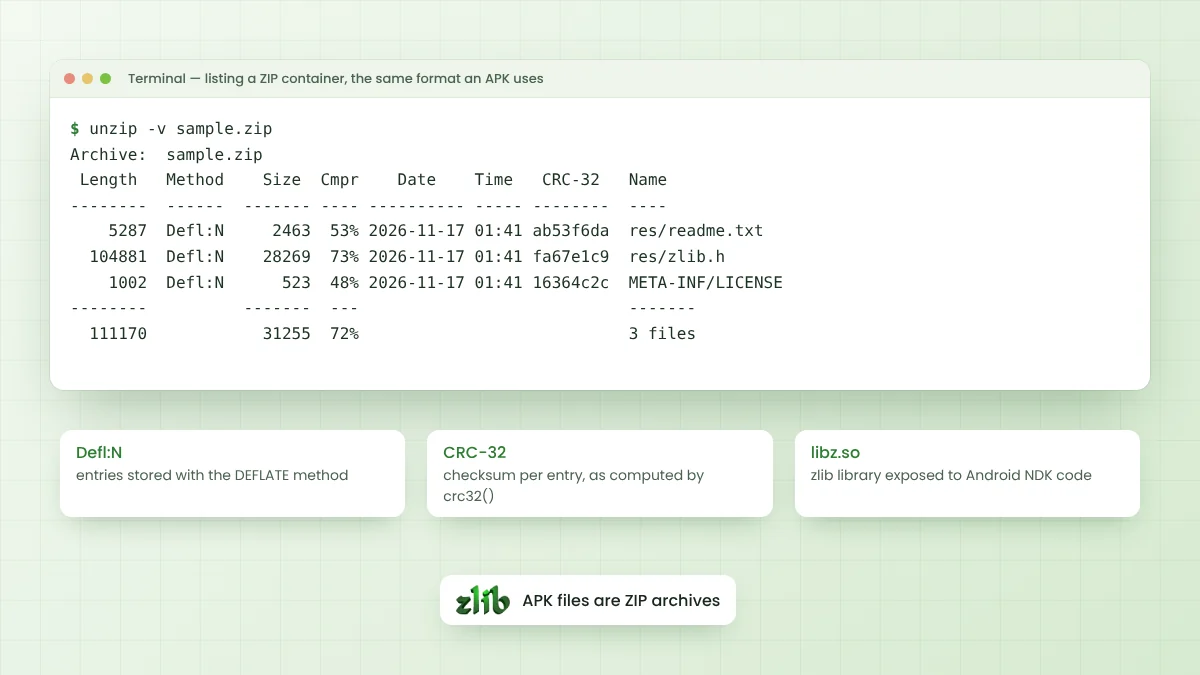
An Android package uses the ZIP container format. Renaming an .apk file to .zip lets any archive tool open it and list the manifest, compiled code, resources and native libraries inside. Each entry records its own compression method and CRC-32 checksum.
The listing below comes from unzip -v run on a small ZIP made with the standard DEFLATE method. APK listings follow the same layout, with the Method column showing which entries were compressed and which were stored as-is.
Length   Method    Size  Cmpr  Name
  5287  Defl:N     2463  53%  res/readme.txt
104881  Defl:N    28269  73%  res/zlib.h
  1002  Defl:N      523  48%  META-INF/LICENSE
How DEFLATE Applies to APK Contents
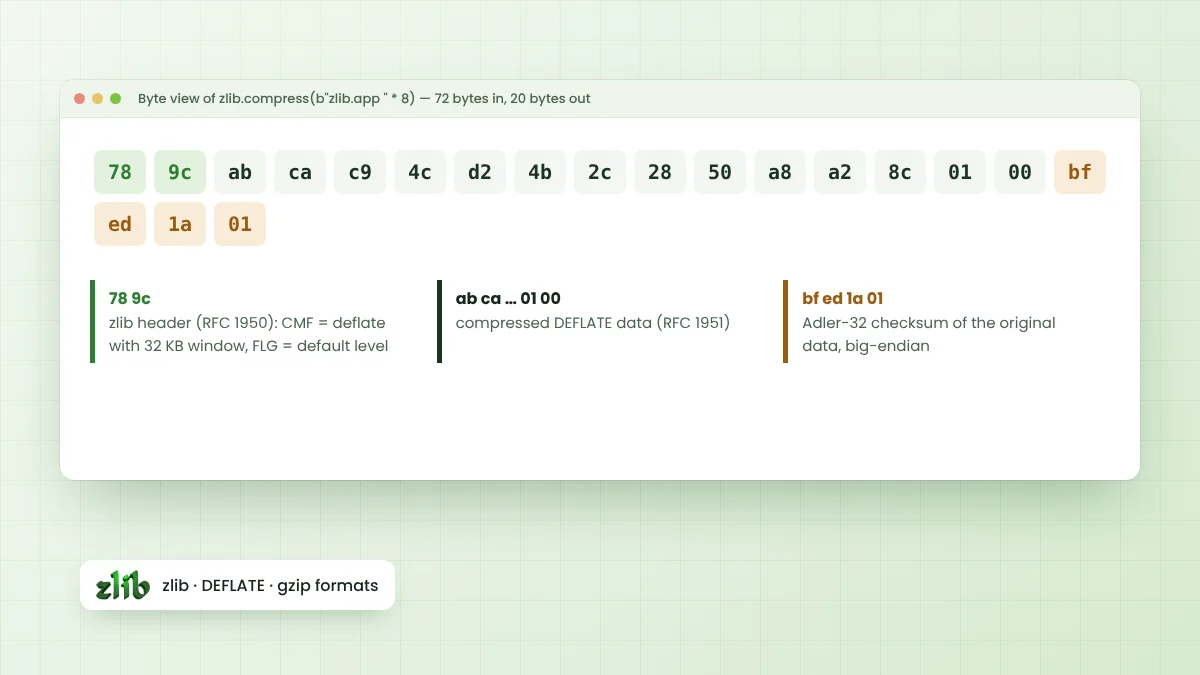
ZIP entries using method 8 hold raw DEFLATE data, the RFC 1951 format, without the two-byte zlib header. That is why tools reading APKs call inflate with negative windowBits, which tells zlib to expect raw DEFLATE instead of a wrapped zlib stream.
Why Some Entries Stay Uncompressed
Not every file inside an APK is compressed. Android build tools can store certain entries uncompressed and aligned so the system reads them directly from the package. Native libraries and the resource table are common examples, depending on the app's build settings.
| Entry type | Common treatment | Reason |
|---|---|---|
| Code files such as classes.dex | Often DEFLATE-compressed | Smaller download size |
| Resource table (resources.arsc) | Stored and aligned on modern targets | Memory-mapped at run time |
| Native libraries (.so) | Compressed or stored, based on settings | Stored files load without extraction |
| Images already compressed (PNG, WebP) | Often stored | Little gain from compressing again |
Using zlib in Android Native Code
Apps that include C or C++ code through the Android NDK can call zlib directly. The NDK exposes zlib as one of its stable native libraries, so native modules include zlib.h and link against the system copy without bundling the source.
# CMakeLists.txt in an Android NDK module
add_library(native-lib SHARED native-lib.c)
target_link_libraries(native-lib z)
In native code, the API is identical to desktop zlib. Calls such as compress2(), inflateInit2() and crc32() behave the same way, which makes code shared between Android, desktop and server builds straightforward to maintain.
Using DEFLATE from Java or Kotlin
Most Android apps never touch C at all. The java.util.zip package available on Android provides Deflater, Inflater, GZIPInputStream, GZIPOutputStream, ZipInputStream and CRC32, covering compression tasks from app code directly.
- Deflater and Inflater produce and read zlib or raw DEFLATE data.
- GZIPOutputStream writes gzip files and streams.
- ZipInputStream walks through entries in ZIP archives, including APKs.
- CRC32 computes the same checksum stored in each ZIP entry.
Data compressed this way is fully compatible with desktop zlib. A server written in C, Python or Node.js can decompress it without any special handling, as the zlib app integration guide shows across several languages.
Android in the zlib ChangeLog
The ChangeLog entry for zlib 1.4 lists improved portability to Android among its changes, alongside AIX, PowerPC, s390x and Windows. Teams that build zlib from source for Android, rather than using the NDK copy, gain from those fixes after updating.
Building from source suits projects needing a specific version across every platform. Using the NDK system library suits projects that prefer less to maintain. Both routes produce data in the same format.
Inspecting an APK Safely
Developers often inspect their own packages to check size and contents. Standard ZIP tools are enough for a first look, and they never execute anything inside the file. Size gains usually come from finding large stored entries or duplicate assets.
- List entries with
unzip -v app.apkto see methods and sizes. - Compare compressed and original sizes in the Cmpr column.
- Use Android Studio's APK Analyzer for a visual breakdown.
- Check alignment with the zipalign tool from the Android SDK build tools.
Practical Size Tips for App Developers
Because the APK container already applies DEFLATE, compressing assets again inside the app rarely helps. Large savings usually come from removing unused resources, choosing efficient image formats and splitting native libraries per device architecture through app bundles.
Data downloaded at run time is a different story. Compressing JSON or text responses with gzip on the server, and letting the HTTP client decompress them, cuts transfer size noticeably on mobile networks.
Server Code That Reads APKs
Tools that scan or repackage APKs on a server, such as build pipelines or app store backends, usually read entries with a ZIP library built on zlib or a compatible inflate. Raw DEFLATE settings and CRC-32 checks keep that processing reliable across millions of entries.
Frequently Asked Questions
No. zlib is a developer library with no user interface, so there is no official APK. Apps that need compression include it inside their own code.
Yes. The Android NDK exposes zlib as a stable native library, and Java or Kotlin code can use the java.util.zip package for the same formats.
ZIP entries hold raw DEFLATE data without a zlib header. Initialise inflate with inflateInit2() and negative windowBits, such as -15, to read it.
APK files are ZIP archives, and their compressed entries use DEFLATE. Build tools may rely on zlib or a compatible implementation to produce them.
Conclusion
Zlib APK questions have a clear answer: zlib is not an app to install, yet it shapes how every APK is packed. The ZIP container stores many entries as raw DEFLATE data, while some stay uncompressed for direct access.
Android developers can call zlib from native code through the NDK or use java.util.zip from Java and Kotlin. Either way, the compressed data stays readable by zlib on any other platform.