Zlib Wiki reference notes on this page gather the terms, formats, constants and functions you meet when working with the zlib library. Each section explains one concept in plain language, with tables you can return to while reading zlib.h or debugging compressed data.
Overview at a Glance
| Type | Lossless data compression library |
|---|---|
| Language | C |
| Authors | Jean-loup Gailly and Mark Adler |
| Algorithm | DEFLATE (LZ77 plus Huffman coding) |
| Formats | zlib (RFC 1950), DEFLATE (RFC 1951), gzip (RFC 1952) |
| License | zlib license |
| Source | github.com/madler/zlib |
| Version in develop ChangeLog | 1.4, dated 4 November 2026 |
Anatomy of a zlib Stream
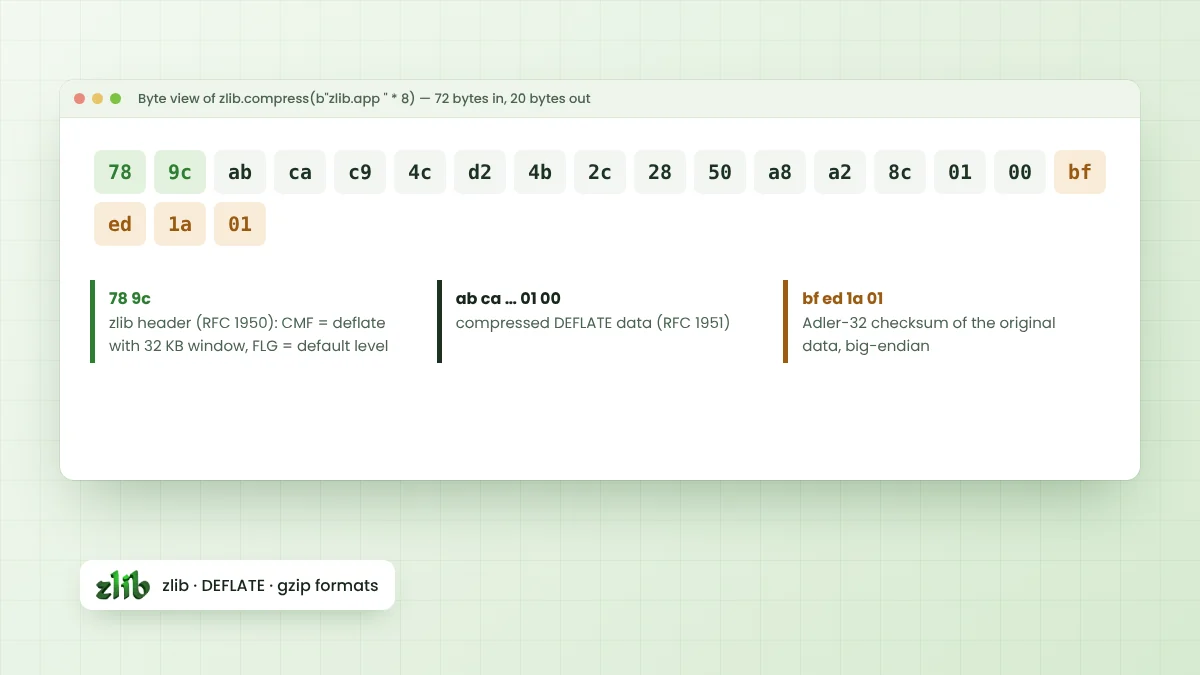
A zlib stream has three parts. Two header bytes describe the method and settings, the DEFLATE data follows, and a four-byte Adler-32 checksum of the original data closes the stream in big-endian order.
Compressing b"zlib.app " * 8, 72 bytes of text, produces a 20-byte stream. Its bytes are shown below, with the header first and the checksum last.
78 9c ab ca c9 4c d2 4b 2c 28 50 a8 a2 8c 01 00 bf ed 1a 01
^^^^^                                               ^^^^^^^^^^^
header                                              Adler-32
Reading the Header
The first byte, 0x78, says the method is DEFLATE with a 32 KB window. The second byte carries a level hint and a check value that makes the two bytes divisible by 31. zlib sets that hint from the compression level, giving these familiar pairs:
| Header bytes | Level hint | Levels that produce it |
|---|---|---|
| 78 01 | Fastest | 0 and 1 |
| 78 5e | Fast | 2 to 5 |
| 78 9c | Default | 6 |
| 78 da | Maximum | 7 to 9 |
gzip streams instead begin with the magic bytes 1f 8b. Spotting either signature at the start of a file is a fast way to tell which wrapper is present.
windowBits and Format Selection
The windowBits argument of deflateInit2() and inflateInit2() does two jobs. Its size sets the history window, from 28 to 215 bytes, and adjustments to the value choose which wrapper the stream uses.
| windowBits value | Meaning |
|---|---|
| 8 to 15 | zlib wrapper with that window size |
| -8 to -15 | Raw DEFLATE, no header or checksum |
| 8 to 15, plus 16 | gzip wrapper (31 is the common choice) |
| 8 to 15, plus 32 | inflate only: detect zlib or gzip automatically |
Core Constants
Compression Level Constants
Z_NO_COMPRESSIONequals 0 and stores data without compressing.Z_BEST_SPEEDequals 1 for the fastest compression.Z_BEST_COMPRESSIONequals 9 for the smallest output.Z_DEFAULT_COMPRESSIONequals -1 and currently maps to level 6.
Flush Values
The flush argument tells deflate() or inflate() how to treat pending data. Z_NO_FLUSH lets zlib choose, Z_SYNC_FLUSH pushes out all pending output on a byte boundary, Z_FULL_FLUSH also resets the history for recovery points, and Z_FINISH completes the stream.
Return Codes
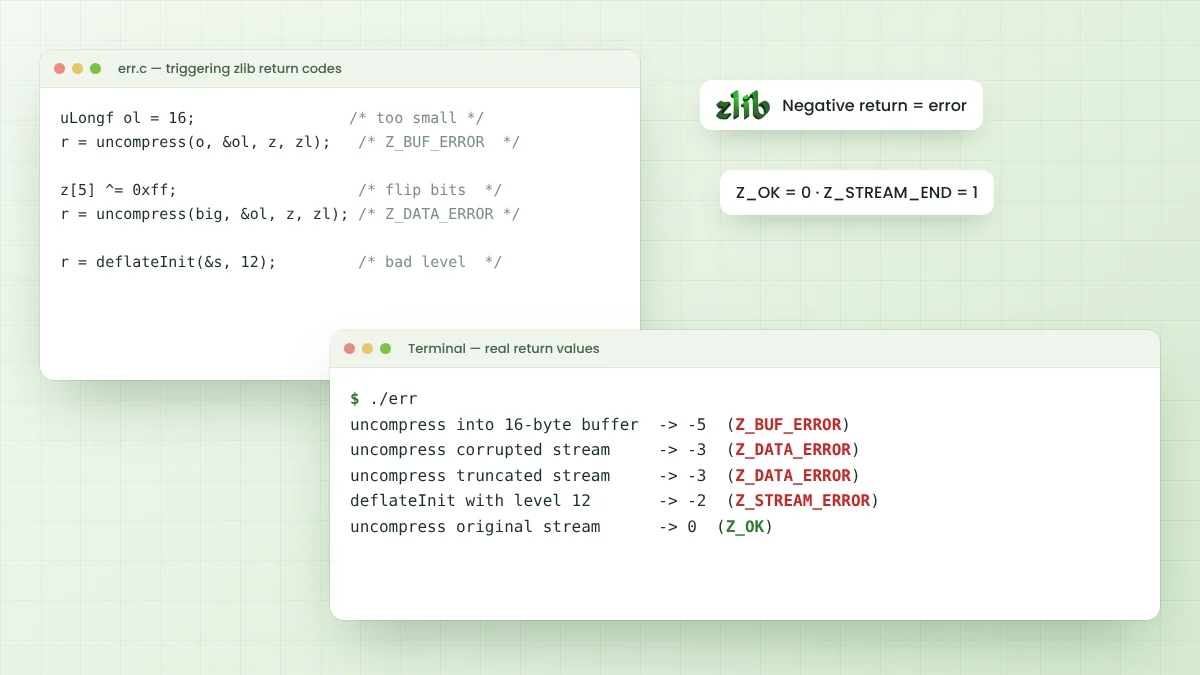
| Constant | Value | Meaning |
|---|---|---|
| Z_OK | 0 | Success |
| Z_STREAM_END | 1 | End of stream reached |
| Z_NEED_DICT | 2 | Preset dictionary required |
| Z_ERRNO | -1 | File error, check errno |
| Z_STREAM_ERROR | -2 | Invalid parameter or stream state |
| Z_DATA_ERROR | -3 | Corrupted or invalid input data |
| Z_MEM_ERROR | -4 | Not enough memory |
| Z_BUF_ERROR | -5 | No progress possible |
| Z_VERSION_ERROR | -6 | Incompatible library version |
Function Families
- Utility: compress, compress2, compressBound, uncompress, uncompress2.
- Streaming: deflateInit, deflateInit2, deflate, deflateEnd, inflateInit, inflateInit2, inflate, inflateEnd.
- Tuning: deflateParams, deflateTune, deflateSetDictionary, deflateReset.
- gzip files: gzopen, gzread, gzwrite, gzprintf, gzseek, gzclose.
- Checksums: crc32, adler32 and their combine functions.
Short Glossary
- z_stream: the structure holding buffers and state for streaming calls.
- memLevel: memory used for compression state, from 1 to 9, default 8.
- Preset dictionary: shared sample data that improves compression of short messages.
- Adler-32: fast checksum used by the zlib format.
- CRC-32: checksum used by gzip and ZIP.
Practical walkthroughs build on these terms. The introduction to zlib covers the big picture, and the zlib errors guide applies the return codes to real debugging.
The gzip Wrapper in Brief
A gzip member starts with the bytes 1f 8b, followed by a compression method byte, flag bits, a modification time, extra flags and an operating system code. Optional fields can store an original file name, a comment and extra data.
After the DEFLATE data, gzip stores a CRC-32 checksum and the original size modulo 232, both in little-endian order. zlib's gz* functions and deflateInit2() with windowBits 31 write this wrapper automatically.
Preset Dictionaries
Short messages compress poorly because DEFLATE has no history to match against. A preset dictionary solves this by loading sample data into the window before compression starts, using deflateSetDictionary() on the sender and inflateSetDictionary() on the receiver.
Both sides must use the exact same dictionary. When inflate meets a stream that was built with one, it returns Z_NEED_DICT, and the Adler-32 value of the required dictionary is available in the stream's adler field.
Related Projects and Tools
- minizip: contributed .zip archive reader and writer in contrib/minizip.
- puff: small reference inflate implementation in contrib/puff.
- pigz: a parallel gzip tool by Mark Adler that builds on zlib.
- zlib-ng and libdeflate: separate DEFLATE implementations covered in the alternatives guide.
Checksum Functions in Practice
crc32() and adler32() can run on their own, outside any compression call. Both accept a starting value and a buffer, so large data can be processed in pieces by passing the previous result back in. The combine functions merge checksums of separate blocks without rereading the data.
Adler-32 is faster to compute, while CRC-32 detects more kinds of errors on short inputs. Formats fix the choice for you, so use the checksum the specification names.
Frequently Asked Questions
0x78 marks DEFLATE with a 32 KB window, and 0x9c is the flag byte zlib writes for the default compression level 6.
It is 15 plus 16, which asks zlib for a 32 KB window wrapped in the gzip format instead of the zlib format.
No. Both are checksums, but zlib streams use Adler-32 while gzip and ZIP use CRC-32. zlib provides functions for both.
The complete API is documented in comments inside zlib.h, and the zlib manual and FAQ are available from zlib.net.
Conclusion
Zlib Wiki notes like these turn a dense header file into an easy reference. Knowing the stream layout, header bytes, windowBits values, constants and return codes covers almost every question that comes up during everyday work.
Keep zlib.h nearby for exact function details, and use these tables to read compressed bytes and return values with confidence.